
CERS Character Engine - Creator Guide
Structured Prompt Building • Version 1.0
Overview
The CERS Character Engine is a structured system for building consistent character prompts.
It replaces freeform prompting with a defined framework, allowing you to control identity, appearance, and visual output with clarity. The system is designed for repeatability while still allowing controlled variation.
Core Workflow
Key Features
- Structured character creation.
- Identity lock for consistency.
- Scene and visual composition control.
- Scene and visual composition control.
- Prompt library with save and reload.
- Natural prompt and structured JSON output.
- Local storage (device-based).
Quick Start
- Select your character details
- Click Generate
- Lock to preserve identity
- Use Variations to explore outputs
- Save to your library if needed
System Structure
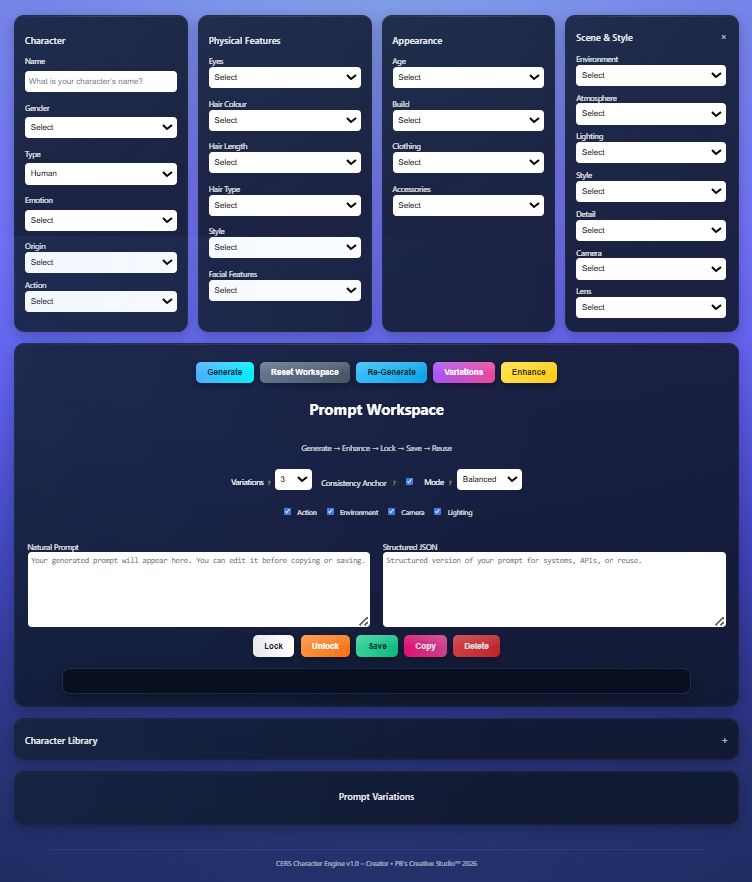
Character
Defines the core identity:
Name, gender, type, emotion, origin, action.
Physical Features
Defines visual traits:
Eyes, hair, facial features, and overall style.
Appearance
Defines presentation:
Age, build, clothing, and accessories.
Scene & Style
Defines visual output:
Environment, lighting, camera, lens, and visual style.
Generating a Prompt
The prompt panel is auto-populated, as you build your character. However, you can also click Generate after selecting your inputs. The system produces:
- A natural prompt (editable).
- A structured JSON version (for reuse or systems).
- You may edit the prompt before copying or saving.
Locking a Character
The Lock function preserves identity across outputs.
When locked:
- Character, Physical, and Appearance fields are fixed.
- Scene and style remain editable.
- Variations maintains the same character.
Use this when consistency is required across outputs.
Unlocking a Character
You can click Unlock to:
- Enable editing.
- Create a new character.
A confirmation step prevents accidental changes.
Variations
The Variation Engine generates up to 7 multiple prompt versions while maintaining control.
You can control:
- Set number of outputs.
- Adjust variation strength.
- Control what changes (action, environment, camera, lighting).
Consistency Anchor:
When enabled:
- Maintains the same character across variations.
- Preserves facial structure and proportions.
Enhance
The Enhance function strengthens the prompt by improving detail, lighting, and composition with:
- Higher detail.
- Improved lighting cues.
- Stronger composition.
Copying Prompts
Click Copy to copy the prompt to your clipboard.
If copying fail, use manual copy from the text field.
Deleting Prompts
To delete a prompt:
- Select it from the library, by clicking on the prompt.
- Click Delete.
This action cannot be undone.
Character Library
Your prompts are stores in the Character Library.
You can:
- Save prompts for reuse.
- Reload and continue editing.
- Delete entries when no longer needed.
Each entry includes:
- A unique ID.
- Date & time saved.
- Prompt text.
Data & Storage
- All data is stored locally on your device.
- No data is transmitted internally.
- Saved prompts remain available after closing the application.
Note: Clearing browser data removes your saved prompts.
Keep backups of important work where necessary.
Best Practice
- Define identity before generating variations.
- Use Lock when consistency is required.
- Keep styles aligned within a set.
- Avoid conflicting selections.
Clarity produces better results than complexity.